Jan 22, 2013•Knowledge
Instructions
This article applies to DSS220.
Connecting to the Dolby CAT745 IMB using the Dolby Media Block Setup application has changed from the methods used with the Dolby DSS200 and CAT862Z.
Use this new method if you are performing color correction or making settings changes on the unit.
Communicate with the Integrated Media Block using an Ethernet connection that is routed through the Show Store (DSS2xx).
- Configure your computer’s network settings to join the Management Network. This is the Theatre Network by default, but may be the Auditorium Network in some situations with different IP schemes. If you are using the standard Dolby IP scheme, you can set your network as:
IP address: 192.168.241.71 (or other available IP address)
Subnet mask: 255.255.255.0
- Once you have configured your networking correctly, run the Dolby Media Block Setup application and select connect to remote device from the ACTION tab.
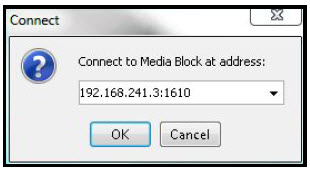
- Insert the IP address of the Show Store that is connected to the CAT745 you wish to communicate with. You must add the port number 1610 at the end of the IP address. For example:
Auditorium 1: 192.168.241.3:1610
Auditorium 8: 192.168.241.10:1610
Auditorium 42: 192.168.241.44:1610
When connected correctly, you will see a screen similar to this (below). Note that there is no serial number displayed — this is normal.
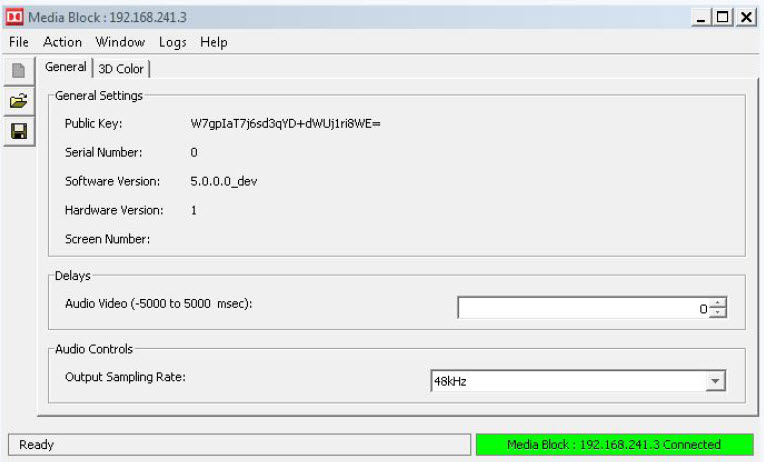
You then have access to change settings or run the color correction on the 3D Color tab the same as you would on a DSP100 or CAT862Z.
If you are experiencing issues and not fully connected to the CAT745 Integrated Media Block, you may see a screen similar to the following figure:
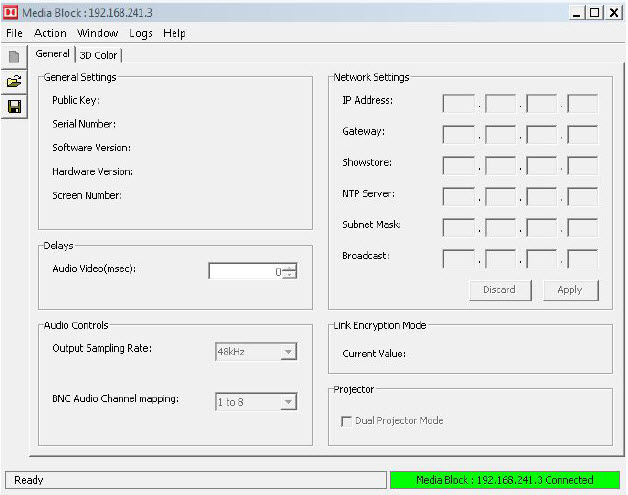
If you do see this screen, check your networking, as you may have an incorrect address or IP network settings.
- Verify that you have the correct IP address for the Show Store and port 1610.
- Check that you have a network route to the MANAGEMENT NETWORK of the Show Store.
- Try pinging the MANAGEMENT NETWORK IP address of the target Show Store from your computer to verify network connectivity.
Note: You may need to disable the firewall and any virus protection software/application running on your computer.
Software/Hardware/Tools required
The following is required for the procedure in this article:
- CAT745 Dolby Integrated Media Block
- Dolby Media Block Setup application (version 2.5.0.0 or later)
Additional Instructions
—
Contact us: How do I Contact Dolby Cinema Support?
Links to Additional Documentation
Disclaimers/Regulatory/Copyright