All DSS200 units have the GPIO card fitted, you will see a 37way D-Sub on the rear panel. The GPIO is configured by an xml file copied to a USB stick and imported into the DSS200 in the «config» script.
Attached is the default xml program with cues called GP01 etc. and a worked example with sample cue names.
As a start, copy the example file onto a USB stick and import it into a DSS200. Please ensure no other files are on the stick as this can confuse the system. You will see the option to import the file just after the projector menus with the stick loaded you will see a list of files found. Select the required file and check the message saying it was imported correctly. Re-boot the system and you should see the new cues in the Build screen.
GPIO on the Dolby DSS200
The GPIO is configured with an XML file. This is edited for the configuration and cue names required. The file is then imported into the DSS200 using the «config» program.
Below is an example of the xml file, this can be edited by a normal text editor like Notepad++ for example.
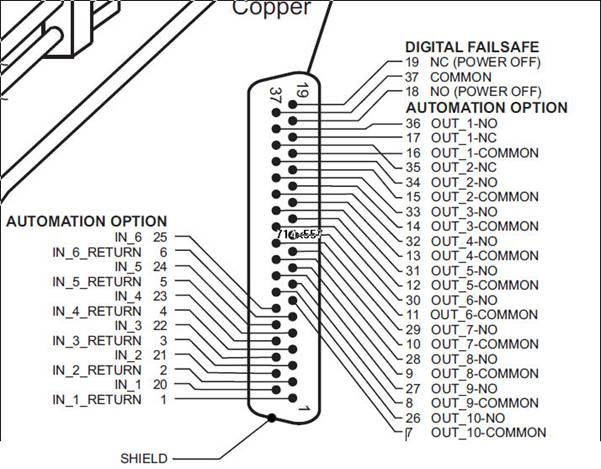
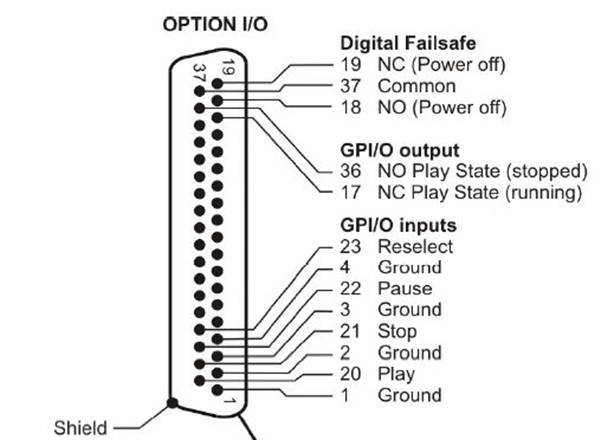
Below is two drawings showing the individual points and the detail for the Play, Stop, Pause, Play and Reselect points.